LocalDrop
RUDownload

ANDROID · MAC · WINDOWS

Your files.
Already nearby.

Send photos, videos and whole folders between devices on the same network. No cloud or account needed.

LocalDrop Demo
Nearby devicesPick a sample file and tap a device
Android
MacBook
Windows
Pick a file
This demo uses a sample file

YOUR FIRST TRANSFER

Send a file in three steps.

  1. Open LocalDrop

    Connect both devices to the same local network.

  2. Choose your files

    On Mac and Windows, drag files straight onto a device bubble.

  3. Tap a device

    On your first transfer, check that the code matches on both screens.

FEATURES

What LocalDrop can do for you

Send a folder in one transfer

On Mac or Windows, drop a folder onto the recipient’s bubble. LocalDrop sends every file, subfolder and empty folder together, with one progress bar.

Project folder
One transfer
Folder received
Automatic folder backup

Keep a copy of your working folder on another device. When you add or edit files, LocalDrop sends the changes from your Mac or Windows PC to a paired device.

How to set it up Open Auto-transfer in Settings and choose a folder and recipient. Confirm the backup location on the receiving device.

Working folder
New and changed files
Backup copy

Android camera auto-upload

Turn on camera auto-upload on Android and choose a paired computer. LocalDrop automatically sends new photos and videos in the background when the computer is reachable on your local network.

What’s next Set up an agent to watch the receive folder and prepare footage for editing, for example by sorting clips by shoot.

Shot on Android
Background transfer
Footage on computer

Send directly over your network

LocalDrop sends original files over an encrypted connection. See speed and duration in the notification and find files in your history.

How your router affects speed

From the LocalDrop creator’s experience

Wi-Fi 5TP-Link Archer C24
6.3 MB/sduring a file transfer
Wi-Fi 7Tenda BE12 Pro
30 MB/son average, occasionally up to 70 MB/s

Speeds depend on your devices, router and network conditions.

What’s new in 0.9.1

App language

Switch between English and Russian on the home screen or follow your system language.

Incoming transfer badge

When the window is closed, new transfers show in the macOS menu bar, the Windows tray or on the Android app icon if your launcher supports badges.

Notifications in your language

Transfer notifications show the file or folder name, size, average speed and duration. Folder transfers also show the file count.

THE LOCALDROP INTERFACE
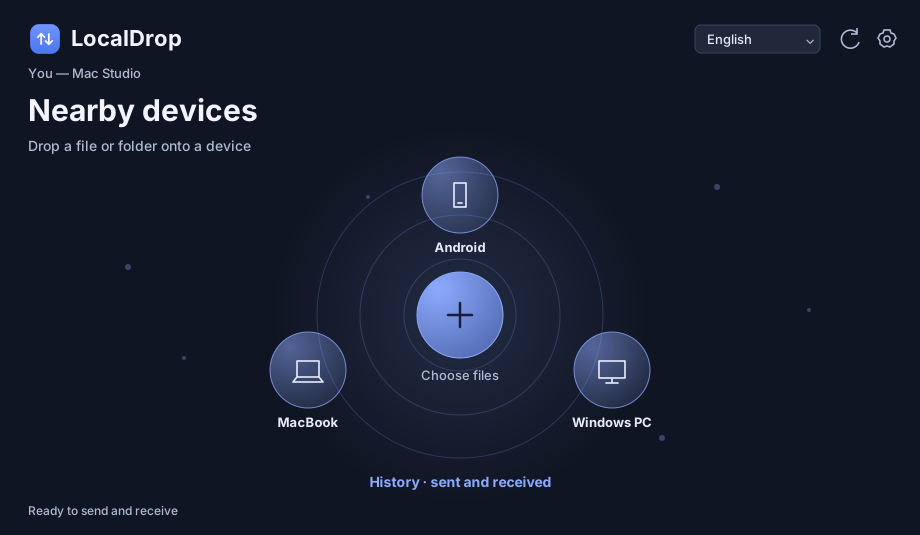
See your devices at a glance.

EVERYDAY USE

Fewer steps in your day.

Photos and video

Shoot on Android and send the originals to your Mac for editing.

Work and study

Move a presentation or project folder to a nearby computer.

At home

Save family photos to your computer and send a copy to another device.

LOCALDROP 0.9.1

Download and open LocalDrop
on both devices.

Android 10+ · macOS 13+ on Apple silicon · Windows 10/11 x64

Download 0.9.1 from Google Drive

APK for Android · DMG for Mac · EXE for Windows

FEEDBACK

Contact the creator.

Found a problem or have an idea for LocalDrop?

@beloshapkins ↗
Review your draft and send it in the chat.